


Standard RAID levels
In computer storage, the standard RAID levels comprise a basic set of RAID ("redundant array of independent disks" or "redundant array of inexpensive disks") configurations that employ the techniques of striping, mirroring, or parity to create large reliable data stores from multiple general-purpose computer hard disk drives (HDDs). The most common types are RAID 0 (striping), RAID 1 (mirroring) and its variants, RAID 5 (distributed parity), and RAID 6 (dual parity). Multiple RAID levels can also be combined or nested, for instance RAID 10 (striping of mirrors) or RAID 01 (mirroring stripe sets). RAID levels and their associated data formats are standardized by the Storage Networking Industry Association (SNIA) in the Common RAID Disk Drive Format (DDF) standard.[1] The numerical values only serve as identifiers and do not signify performance, reliability, generation, or any other metric.
While most RAID levels can provide good protection against and recovery from hardware defects or defective sectors/read errors (hard errors), they do not provide any protection against data loss due to catastrophic failures (fire, water) or soft errors such as user error, software malfunction, or malware infection. For valuable data, RAID is only one building block of a larger data loss prevention and recovery scheme – it cannot replace a backup plan.
RAID 0[edit]

RAID 0 (also known as a stripe set or striped volume) splits ("stripes") data evenly across two or more disks, without parity information, redundancy, or fault tolerance. Since RAID 0 provides no fault tolerance or redundancy, the failure of one drive will cause the entire array to fail, due to data being striped across all disks. This configuration is typically implemented having speed as the intended goal.[2][3] RAID 0 is normally used to increase performance, although it can also be used as a way to create a large logical volume out of two or more physical disks.[4]
A RAID 0 setup can be created with disks of differing sizes, but the storage space added to the array by each disk is limited to the size of the smallest disk. For example, if a 120 GB disk is striped together with a 320 GB disk, the size of the array will be 120 GB × 2 = 240 GB. However, some RAID implementations would allow the remaining 200 GB to be used for other purposes.
The diagram in this section shows how the data is distributed into stripes on two disks, with A1:A2 as the first stripe, A3:A4 as the second one, etc. Once the stripe size is defined during the creation of a RAID 0 array, it needs to be maintained at all times. Since the stripes are accessed in parallel, an n-drive RAID 0 array appears as a single large disk with a data rate n times higher than the single-disk rate.
Performance[edit]
A RAID 0 array of n drives provides data read and write transfer rates up to n times as high as the individual drive rates, but with no data redundancy. As a result, RAID 0 is primarily used in applications that require high performance and are able to tolerate lower reliability, such as in scientific computing[5] or computer gaming.[6]
Some benchmarks of desktop applications show RAID 0 performance to be marginally better than a single drive.[7][8] Another article examined these claims and concluded that "striping does not always increase performance (in certain situations it will actually be slower than a non-RAID setup), but in most situations it will yield a significant improvement in performance".[9][10] Synthetic benchmarks show different levels of performance improvements when multiple HDDs or SSDs are used in a RAID 0 setup, compared with single-drive performance. However, some synthetic benchmarks also show a drop in performance for the same comparison.[11][12]
RAID 1[edit]

RAID 1 consists of an exact copy (or mirror) of a set of data on two or more disks; a classic RAID 1 mirrored pair contains two disks. This configuration offers no parity, striping, or spanning of disk space across multiple disks, since the data is mirrored on all disks belonging to the array, and the array can only be as big as the smallest member disk. This layout is useful when read performance or reliability is more important than write performance or the resulting data storage capacity.[13][14]
The array will continue to operate so long as at least one member drive is operational.[15]
Performance[edit]
Any read request can be serviced and handled by any drive in the array; thus, depending on the nature of I/O load, random read performance of a RAID 1 array may equal up to the sum of each member's performance,[a] while the write performance remains at the level of a single disk. However, if disks with different speeds are used in a RAID 1 array, overall write performance is equal to the speed of the slowest disk.[14][15]
Synthetic benchmarks show varying levels of performance improvements when multiple HDDs or SSDs are used in a RAID 1 setup, compared with single-drive performance. However, some synthetic benchmarks also show a drop in performance for the same comparison.[11][12]
RAID 2[edit]

RAID 2, which is rarely used in practice, stripes data at the bit (rather than block) level, and uses a Hamming code for error correction. The disks are synchronized by the controller to spin at the same angular orientation (they reach index at the same time[16]), so it generally cannot service multiple requests simultaneously.[17][18] However, depending with a high rate Hamming code, many spindles would operate in parallel to simultaneously transfer data so that "very high data transfer rates" are possible[19] as for example in the Thinking Machines' DataVault where 32 data bits were transmitted simultaneously. The IBM 353[20] also observed a similar usage of Hamming code and was capable of transmitting 64 data bits simultaneously, along with 8 ECC bits.
With all hard disk drives implementing internal error correction, the complexity of an external Hamming code offered little advantage over parity so RAID 2 has been rarely implemented; it is the only original level of RAID that is not currently used.[17][18]
RAID 3[edit]

RAID 3, which is rarely used in practice, consists of byte-level striping with a dedicated parity disk. One of the characteristics of RAID 3 is that it generally cannot service multiple requests simultaneously, which happens because any single block of data will, by definition, be spread across all members of the set and will reside in the same physical location on each disk. Therefore, any I/O operation requires activity on every disk and usually requires synchronized spindles.
This makes it suitable for applications that demand the highest transfer rates in long sequential reads and writes, for example uncompressed video editing. Applications that make small reads and writes from random disk locations will get the worst performance out of this level.[18]
The requirement that all disks spin synchronously (in a lockstep) added design considerations that provided no significant advantages over other RAID levels. Both RAID 3 and RAID 4 were quickly replaced by RAID 5.[21] RAID 3 was usually implemented in hardware, and the performance issues were addressed by using large disk caches.[18]
RAID 4[edit]

RAID 4 consists of block-level striping with a dedicated parity disk. As a result of its layout, RAID 4 provides good performance of random reads, while the performance of random writes is low due to the need to write all parity data to a single disk,[22] unless the filesystem is RAID-4-aware and compensates for that.
An advantage of RAID 4 is that it can be quickly extended online, without parity recomputation, as long as the newly added disks are completely filled with 0-bytes.
In diagram 1, a read request for block A1 would be serviced by disk 0. A simultaneous read request for block B1 would have to wait, but a read request for B2 could be serviced concurrently by disk 1.
RAID 5[edit]

RAID 5 consists of block-level striping with distributed parity. Unlike in RAID 4, parity information is distributed among the drives. It requires that all drives but one be present to operate. Upon failure of a single drive, subsequent reads can be calculated from the distributed parity such that no data is lost.[5] RAID 5 requires at least three disks.[23]
There are many layouts of data and parity in a RAID 5 disk drive array depending upon the sequence of writing across the disks,[24] that is:
- the sequence of data blocks written, left to right or right to left on the disk array, of disks 0 to N.
- the location of the parity block at the beginning or end of the stripe.
- the location of the first block of a stripe with respect to parity of the previous stripe.
The figure shows 1) data blocks written left to right, 2) the parity block at the end of the stripe and 3) the first block of the next stripe not on the same disk as the parity block of the previous stripe. It can be designated as a Left Asynchronous RAID 5 layout[24] and this is the only layout identified in the last edition of The Raid Book[25] published by the defunct Raid Advisory Board.[26] In a Synchronous layout the data first block of the next stripe is written on the same drive as the parity block of the previous stripe.
In comparison to RAID 4, RAID 5's distributed parity evens out the stress of a dedicated parity disk among all RAID members. Additionally, write performance is increased since all RAID members participate in the serving of write requests. Although it will not be as efficient as a striping (RAID 0) setup, because parity must still be written, this is no longer a bottleneck.[27]
Since parity calculation is performed on the full stripe, small changes to the array experience write amplification[citation needed]: in the worst case when a single, logical sector is to be written, the original sector and the according parity sector need to be read, the original data is removed from the parity, the new data calculated into the parity and both the new data sector and the new parity sector are written.
RAID 6[edit]

RAID 6 extends RAID 5 by adding another parity block; thus, it uses block-level striping with two parity blocks distributed across all member disks.[28]
As in RAID 5, there are many layouts of RAID 6 disk arrays depending upon the direction the data blocks are written, the location of the parity blocks with respect to the data blocks and whether or not the first data block of a subsequent stripe is written to the same drive as the last parity block of the prior stripe. The figure to the right is just one of many such layouts.
According to the Storage Networking Industry Association (SNIA), the definition of RAID 6 is: "Any form of RAID that can continue to execute read and write requests to all of a RAID array's virtual disks in the presence of any two concurrent disk failures. Several methods, including dual check data computations (parity and Reed–Solomon), orthogonal dual parity check data and diagonal parity, have been used to implement RAID Level 6."[29]
Performance[edit]
RAID 6 does not have a performance penalty for read operations, but it does have a performance penalty on write operations because of the overhead associated with parity calculations. Performance varies greatly depending on how RAID 6 is implemented in the manufacturer's storage architecture—in software, firmware, or by using firmware and specialized ASICs for intensive parity calculations. RAID 6 can read up to the same speed as RAID 5 with the same number of physical drives.[30]
When either diagonal or orthogonal dual parity is used, a second parity calculation is necessary for write operations. This doubles CPU overhead for RAID-6 writes, versus single-parity RAID levels. When a Reed Solomon code is used, the second parity calculation is unnecessary.[citation needed] Reed Solomon has the advantage of allowing all redundancy information to be contained within a given stripe.[clarification needed]
General parity system[edit]
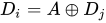
It is possible to support a far greater number of drives by choosing the parity function more carefully. The issue we face is to ensure that a system of equations over the finite field has a unique solution, so we will turn to the theory of polynomial equations. Consider the Galois field with . This field is isomorphic to a polynomial field for a suitable irreducible polynomial of degree over . We will represent the data elements as polynomials in the Galois field. Let correspond to the stripes of data across hard drives encoded as field elements in this manner. We will use to denote addition in the field, and concatenation to denote multiplication. The reuse of is intentional: this is because addition in the finite field represents to the XOR operator, so computing the sum of two elements is equivalent to computing XOR on the polynomial coefficients.


![{\displaystyle F_{2}[x]/(p(x))}](https://wikimedia.org/api/rest_v1/media/math/render/svg/5a94539f2b3a0114d3e0d1f244a9a4a657b0995d)





A generator of a field is an element of the field such that is different for each non-negative . This means each element of the field, except the value , can be written as a power of A finite field is guaranteed to have at least one generator. Pick one such generator , and define and as follows:




As before, the first checksum is just the XOR of each stripe, though interpreted now as a polynomial. The effect of can be thought of as the action of a carefully chosen linear feedback shift register on the data chunk.[31] Unlike the bit shift in the simplified example, which could only be applied times before the encoding began to repeat, applying the operator multiple times is guaranteed to produce unique invertible functions, which will allow a chunk length of to support up to data pieces.


If one data chunk is lost, the situation is similar to the one before. In the case of two lost data chunks, we can compute the recovery formulas algebraically. Suppose that and are the lost values with , then, using the other values of , we find constants and :




We can solve for in the second equation and plug it into the first to find , and then .


Unlike P, The computation of Q is relatively CPU intensive, as it involves polynomial multiplication in . This can be mitigated with a hardware implementation or by using an FPGA.
The above Vandermonde matrix solution can be extended to triple parity, but for beyond a Cauchy matrix construction is required.[32]
Comparison[edit]
The following table provides an overview of some considerations for standard RAID levels. In each case, array space efficiency is given as an expression in terms of the number of drives, n; this expression designates a fractional value between zero and one, representing the fraction of the sum of the drives' capacities that is available for use. For example, if three drives are arranged in RAID 3, this gives an array space efficiency of 1 − 1/n = 1 − 1/3 = 2/3 ≈ 67%; thus, if each drive in this example has a capacity of 250 GB, then the array has a total capacity of 750 GB but the capacity that is usable for data storage is only 500 GB. Different RAID configurations can also detect failure during so called data scrubbing.
Historically disks were subject to lower reliability and RAID levels were also used to detect which disk in the array had failed in addition to that a disk had failed. Though as noted by Patterson et al. even at the inception of RAID many (though not all) disks were already capable of finding internal errors using error correcting codes. In particular it is/was sufficient to have a mirrored set of disks to detect a failure, but two disks were not sufficient to detect which had failed in a disk array without error correcting features.[33] Modern RAID arrays depend for the most part on a disk's ability to identify itself as faulty which can be detected as part of a scrub. The redundant information is used to reconstruct the missing data, rather than to identify the faulted drive. Drives are considered to have faulted if they experience an unrecoverable read error, which occurs after a drive has retried many times to read data and failed. Enterprise drives may also report failure in far fewer tries than consumer drives as part of TLER to ensure a read request is fulfilled in a timely manner.[34]
| Level | Description | Minimum number of drives[b] | Space efficiency | Fault tolerance | Fault isolation | Read performance | Write performance |
|---|---|---|---|---|---|---|---|
| as factor of single disk | |||||||
| RAID 0 | Block-level striping without parity or mirroring | 2 | 1 | None | Drive Firmware Only | n | n |
| RAID 1 | Mirroring without parity or striping | 2 | 1/n | n − 1 drive failures | Drive Firmware or voting if n > 2 | n[a][15] | 1[c][15] |
| RAID 2 | Bit-level striping with Hamming code for error correction | 3 | 1 − 1/n log2 (n + 1) | One drive failure[d] | Drive Firmware and Parity | Depends[clarification needed] | Depends[clarification needed] |
| RAID 3 | Byte-level striping with dedicated parity | 3 | 1 − 1/n | One drive failure | Drive Firmware and Parity | n − 1 | n − 1[e] |
| RAID 4 | Block-level striping with dedicated parity | 3 | 1 − 1/n | One drive failure | Drive Firmware and Parity | n − 1 | n − 1[e][citation needed] |
| RAID 5 | Block-level striping with distributed parity | 3 | 1 − 1/n | One drive failure | Drive Firmware and Parity | n[e] | single sector: 1/4[f] full stripe: n − 1[e][citation needed] |
| RAID 6 | Block-level striping with double distributed parity | 4 | 1 − 2/n | Two drive failures | Drive Firmware and Parity | n[e] | single sector: 1/6[f] full stripe: n − 2[e][citation needed] |
System implications[edit]
In measurement of the I/O performance of five filesystems with five storage configurations—single SSD, RAID 0, RAID 1, RAID 10, and RAID 5 it was shown that F2FS on RAID 0 and RAID 5 with eight SSDs outperforms EXT4 by 5 times and 50 times, respectively. The measurements also suggest that the RAID controller can be a significant bottleneck in building a RAID system with high speed SSDs.[36]
Nested RAID[edit]
Combinations of two or more standard RAID levels. They are also known as RAID 0+1 or RAID 01, RAID 0+3 or RAID 03, RAID 1+0 or RAID 10, RAID 5+0 or RAID 50, RAID 6+0 or RAID 60, and RAID 10+0 or RAID 100.
Non-standard variants[edit]
In addition to standard and nested RAID levels, alternatives include non-standard RAID levels, and non-RAID drive architectures. Non-RAID drive architectures are referred to by similar terms and acronyms, notably JBOD ("just a bunch of disks"), SPAN/BIG, and MAID ("massive array of idle disks").
Notes[edit]
- ^ a b Theoretical maximum, as low as single-disk performance in practice
- ^ Assumes a non-degenerate minimum number of drives
- ^ If disks with different speeds are used in a RAID 1 array, overall write performance is equal to the speed of the slowest disk.
- ^ RAID 2 can recover from one drive failure or repair corrupt data or parity when a corrupted bit's corresponding data and parity are good.
- ^ a b c d e f Assumes hardware capable of performing associated calculations fast enough
- ^ a b When modifying less than a stripe of data, RAID 5 and 6 requires the use of read-modify-write (RMW) or reconstruct-write (RCW) to reduce a small-write penalty. RMW writes data after reading the current stripe (so that it can have a difference to update the parity with); the spinaround time gives a fractional factor of 2, and the number of disks to write gives another factor of 2 in RAID 5 and 3 in RAID 6. RCW writes immediately, than reconstructs the parity by reading all associated stripes from other disks. RCW is usually faster than RMW when the number of disks is small, but has the downside of waking up all disks (additional start-stop cycles may shorten lifespan). RCW is the only possible write method for a degraded stripe.[35]
References[edit]
- ^ "Common raid Disk Data Format (DDF)". SNIA.org. Storage Networking Industry Association. Retrieved 2013-04-23.
- ^ "RAID 0 Data Recovery". DataRecovery.net. Retrieved 2015-04-30.
- ^ "Understanding RAID". CRU-Inc.com. Retrieved 2015-04-30.
- ^ "How to Combine Multiple Hard Drives Into One Volume for Cheap, High-Capacity Storage". LifeHacker.com. 2013-02-26. Retrieved 2015-04-30.
- ^ a b Chen, Peter; Lee, Edward; Gibson, Garth; Katz, Randy; Patterson, David (1994). "RAID: High-Performance, Reliable Secondary Storage". ACM Computing Surveys. 26 (2): 145–185. CiteSeerX 10.1.1.41.3889. doi:10.1145/176979.176981. S2CID 207178693.
- ^ de Kooter, Sebastiaan (2015-04-13). "Gaming storage shootout 2015: SSD, HDD or RAID 0, which is best?". GamePlayInside.com. Retrieved 2015-09-22.
- ^ "Western Digital's Raptors in RAID-0: Are two drives better than one?". AnandTech.com. AnandTech. July 1, 2004. Retrieved 2007-11-24.
- ^ "Hitachi Deskstar 7K1000: Two Terabyte RAID Redux". AnandTech.com. AnandTech. April 23, 2007. Retrieved 2007-11-24.
- ^ "RAID 0: Hype or blessing?". Tweakers.net. Persgroep Online Services. August 7, 2004. Retrieved 2008-07-23.
- ^ "Does RAID0 Really Increase Disk Performance?". HardwareSecrets.com. November 1, 2006.
- ^ a b Larabel, Michael (2014-10-22). "Btrfs RAID HDD Testing on Ubuntu Linux 14.10". Phoronix. Retrieved 2015-09-19.
- ^ a b Larabel, Michael (2014-10-29). "Btrfs on 4 × Intel SSDs In RAID 0/1/5/6/10". Phoronix. Retrieved 2015-09-19.
- ^ "FreeBSD Handbook: 19.3. RAID 1 – Mirroring". FreeBSD.org. 2014-03-23. Retrieved 2014-06-11.
- ^ a b "Which RAID Level is Right for Me?: RAID 1 (Mirroring)". Adaptec.com. Adaptec. Retrieved 2014-01-02.
- ^ a b c d "Selecting the Best RAID Level: RAID 1 Arrays (Sun StorageTek SAS RAID HBA Installation Guide)". Docs.Oracle.com. Oracle Corporation. 2010-12-23. Retrieved 2014-01-02.
- ^ "RAID 2". Techopedia. 27 February 2012. Retrieved 11 December 2019.
- ^ a b Vadala, Derek (2003). Managing RAID on Linux. O'Reilly Series (illustrated ed.). O'Reilly. p. 6. ISBN 9781565927308.
- ^ a b c d Marcus, Evan; Stern, Hal (2003). Blueprints for high availability (2, illustrated ed.). John Wiley and Sons. p. 167. ISBN 9780471430261.
- ^ The RAIDbook, 4th Edition, The RAID Advisory Board, June 1995, p.101
- ^ "IBM Stretch (aka IBM 7030 Data Processing System)". www.brouhaha.com. Retrieved 2023-09-13.
- ^ Meyers, Michael; Jernigan, Scott (2003). Mike Meyers' A+ Guide to Managing and Troubleshooting PCs (illustrated ed.). McGraw-Hill Professional. p. 321. ISBN 9780072231465.
- ^ Natarajan, Ramesh (2011-11-21). "RAID 2, RAID 3, RAID 4 and RAID 6 Explained with Diagrams". TheGeekStuff.com. Retrieved 2015-01-02.
- ^ "RAID 5 Data Recovery FAQ". VantageTech.com. Vantage Technologies. Retrieved 2014-07-16.
- ^ a b "RAID Information - Linux RAID-5 Algorithms". Ashford computer Consulting Service. Retrieved February 16, 2021.
- ^ Massigilia, Paul (February 1997). The RAID Book, 6th Edition. RAID Advisory Board. pp. 101–129.
- ^ "Welcome to the RAID Advisory Board". RAID Advisory Board. April 6, 2001. Archived from the original on 2001-04-06. Retrieved February 16, 2021. Last valid archived webpage at Wayback Machine
- ^ Koren, Israel. "Basic RAID Organizations". ECS.UMass.edu. University of Massachusetts. Retrieved 2014-11-04.
- ^ "Sun StorageTek SAS RAID HBA Installation Guide, Appendix F: Selecting the Best RAID Level: RAID 6 Arrays". Docs.Oracle.com. 2010-12-23. Retrieved 2015-08-27.
- ^ "Dictionary R". SNIA.org. Storage Networking Industry Association. Retrieved 2007-11-24.
- ^ Faith, Rickard E. (13 May 2009). "A Comparison of Software RAID Types".
{{cite journal}}: Cite journal requires|journal=(help) - ^ Anvin, H. Peter (May 21, 2009). "The Mathematics of RAID-6" (PDF). Kernel.org. Linux Kernel Organization. Retrieved November 4, 2009.
- ^ "bcachefs-tools: raid.c". GitHub. 27 May 2023.
- ^ Patterson, David A.; Gibson, Garth; Katz, Randy H. (1988). "A case for redundant arrays of inexpensive disks (RAID)" (PDF). Proceedings of the 1988 ACM SIGMOD international conference on Management of data - SIGMOD '88. p. 112. doi:10.1145/50202.50214. ISBN 0897912683. S2CID 52859427. Retrieved 25 June 2022.
A single parity disk can detect a single error, but to correct an error we need enough check disks to identify the disk with the error. [...] Most check disks in the level 2 RAID are used to determine which disk failed, for only one redundant parity disk is needed to detect an error. These extra disks are truly "redundant" since most disk controllers can already detect If a dusk failed either through special signals provided in the disk interface or the extra checking information at the end of a sector
- ^ "Enterprise vs Desktop Harddrives" (PDF). Intel.com. Intel. p. 10.
- ^ Thomasian, Alexander (February 2005). "Reconstruct versus read-modify writes in RAID". Information Processing Letters. 93 (4): 163–168. doi:10.1016/j.ipl.2004.10.009.
- ^ Park, Chanhyun; Lee, Seongjin; Won, Youjip (2014). "An Analysis on Empirical Performance of SSD-Based RAID". Information Sciences and Systems 2014. Vol. 2014. pp. 395–405. doi:10.1007/978-3-319-09465-6_41. ISBN 978-3-319-09464-9.
{{cite book}}:|journal=ignored (help)
Further reading[edit]
- "Learning About RAID". Support.Dell.com. Dell. 2009. Archived from the original on 2009-02-20. Retrieved 2016-04-15.
- Redundant Arrays of Inexpensive Disks (RAIDs), chapter 38 from the Operating Systems: Three Easy Pieces book by Remzi H. Arpaci-Dusseau and Andrea C. Arpaci-Dusseau