


Caps Lock

Caps Lock ⇪ Caps Lock is a button on a computer keyboard that causes all letters of bicameral scripts to be generated in capital letters. It is a toggle key: each press reverses the previous action. Some keyboards also implement a light to give visual feedback about whether it is on or off. Exactly what Caps Lock does depends on the keyboard hardware, the operating system, the device driver, and the keyboard layout. Usually, the effect is limited to letter keys. Letters of non-bicameral scripts (e.g. Arabic, Hebrew, Hindi) and non-letter characters are generated normally.
History[edit]

The Caps Lock key originated as a Shift lock key on mechanical typewriters. An early innovation in typewriters was the introduction of a second character on each typebar, thereby doubling the number of characters that could be typed, using the same number of keys. The second character was positioned above the first on the face of each typebar, and the typewriter's Shift key caused the entire type apparatus to move, physically shifting the positioning of the typebars relative to the ink ribbon. Just as in modern computer keyboards, the shifted position was used to produce capitals and secondary characters.
The Shift lock key was introduced so the shift operation could be maintained indefinitely without continuous effort. It mechanically locked the typebars in the shifted position, causing the upper character to be typed upon pressing any key. Because the two shift keys on a typewriter required more force to operate and were meant to be pressed by the little finger, it could be difficult to hold the shift down for more than two or three consecutive strokes, therefore the introduction of the Shift lock key was also meant to reduce finger muscle pain caused by repetitive typing.[citation needed]
Mechanical typewriter shift lock is typically set by pushing both Shift and lock at the same time, and released by pressing Shift by itself. Computer Caps Lock is set and released by the same key, and the Caps Lock behavior in most QWERTY keyboard layouts differs from the Shift lock behavior in that it capitalizes letters but does not affect other keys, such as numbers or punctuation. Some early computer keyboards, such as the Commodore 64, had a Shift lock but no Caps Lock; others, such as the BBC Micro, had both, only one of which could be enabled at a time.[citation needed]
Abolition[edit]
There are some proposals to abolish the caps-lock key as being obsolete.[1][2][3] Pieter Hintjens, the CEO of iMatix, started a "Capsoff" organization proposing hardware manufacturers delete the Caps Lock key.[1] Google has removed the Caps Lock on the Chromebook keyboard, replacing it with the "Everything Button"; the caps-lock function is then reproduced using an "alt" key combination.[4][5]
In fact, the current German keyboard layout standard DIN 2137-01:2023-08 (like its preceding edition from 2018) specifies the function of the key as optional, to be replaced by other keys or key combinations. It recommends the function only to be invoked when it is pressed simultaneously with the Control key, while otherwise it acts as a “left AltGr key”, thus enabling touch typists to access all key combinations using AltGr without using two fingers of the same hand, which is considered to be an ergonomic advantage. As a side effect, any inadvertent pressing of this key without pressing another key simultaneously has no effect.
Behavior[edit]

Typical Caps Lock behavior is that pressing the key sets an input mode in which all typed letters are uppercase, if applicable. The keyboard remains in Caps Lock mode and would generate all caps text until the key is pressed again. Keyboards often include a small LED to indicate that Caps Lock is active, either on the key itself or in a dedicated indicators area, where Scroll Lock and Num Lock indicators are also located. On the original IBM PC keyboard, this LED was exclusively controlled by the keyboard. Since the introduction of IBM PC/AT, it is under control of the operating system. Small keyboards, such as netbook keyboards, forgo the indicators to conserve space, instead providing software that gives on-screen or audio feedback.
In most cases, the status of the Caps Lock key only changes the meaning of the alphabet keys, not that of any other key. Microsoft Windows enforces this behavior only when a keyboard layout for a Latin-based script is active, e.g. the "English (United States)" layout but not the "Persian" layout. On certain non-QWERTY keyboard layouts, such as the French AZERTY and the German QWERTZ, Caps Lock still behaves like a traditional Shift lock, i.e., the keyboard behaves as if the Shift key is held down, causing the keyboard to input the alternative values of the keys; example the "5" key generates a "%" when Caps Lock is pressed. This is not true for the layout "German (IBM)".
Depending on the keyboard layout used, the Shift key, when pressed in combination with a Latin-based letter button while Caps Lock is already on, is either ignored, or reverses the effect of Caps Lock, so that typed characters are in lowercase again. Microsoft Windows enforces the latter. RISC OS offers both – Caps Lock alone chooses the former, Shift-Caps Lock the latter.
While the typical locking behavior on keyboards with Caps Lock key is that of a toggle, each press reversing the shift state, some keyboard layouts implement a combi mode,[example needed] where pressing a Shift key in Caps Lock mode will also release the Caps Lock mode, just as it typically happens in Shift lock mode.
Some keyboard drivers[example needed] include a configuration option to deactivate the Caps Lock key. This behavior allows users to decide themselves whether they want to use the key, or to disable it to prevent accidental activation.
In the Unix communities of the ex-USSR countries, Caps Lock key is traditionally used as input language switcher, convenient for usage with touch typing. Support for this is present in KDE,[6] GNOME and other desktop environments. Default Russian and Ukrainian layouts for FreeBSD specify Caps Lock as input language switcher. In Microsoft Windows, third-party utilities are needed to enable this behavior.[7][8] In such configurations, the original Caps Lock function is reached with the ⇧ Shift+⇪ Caps Lock combination.
Precautions[edit]
Most apps that request users to input a password do not display it on screen, so as not to expose it to prying eyes. A user who does not pay proper attention to the Caps Lock indicator might type the wrong password (in which all small letters become capital letters or vice versa). As such, help guides, tech support materials, and app user interfaces may include warnings on checking the Caps Lock state before typing a password. In Microsoft Windows login screens, a warning that Caps Lock is on is shown in a balloon near the field. In macOS, when Caps Lock is on, a Caps Lock symbol (⇪) is displayed inside a password field.
Placement[edit]

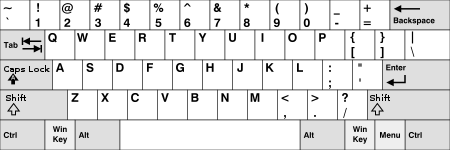
Since its inception, the IBM PC keyboard had a Caps Lock. In the first version for PC/XT, Caps Lock was located to the bottom right of the letter keys area. Subsequent models switched the places of the Caps Lock key and the Control key. As such, Caps Lock has since been placed on left edge of the keyboard, above the Shift key and below the Tab key, next to letter A. This layout has become the de facto popular standard.
The keyboards of some early computer terminals, including the Teletype Model 33 ASR and Lear-Siegler ADM-3A, the Apple II and a few Apple Keyboard models retained the Control key where PC/XT first had it; Caps Lock was either absent on these devices or was placed elsewhere. This layout was preserved for later workstation systems and is often associated with Unix workstations. Keyboards from Sun Microsystems came in two layouts; "Unix" and "PC-style", with the Unix layout having the traditional placing of the Control key and other keys.[9] The Amiga computers all had both the Control key and Caps Lock key in this spot at half the width.
Some users of keyboards with Caps Lock on the left remap the keys to exchange Control and Caps Lock, finding the traditional location more ergonomic for using programs benefiting from use of the Control key. Keyboard layout preferences specifically to address this need are available in some operating systems. Some keyboards even provide a switch on the bottom to logically swap the two keys in hardware.[10][11]
The Happy Hacking Keyboard and the keyboards produced for OLPC XO computers also have the Control key in this location, while not including a Caps Lock.[12] Beginning with the Google Cr-48, Chromebooks have omitted Caps Lock in favor of either a Search button or an "Everything Button".[13] Holding down Alt and pressing the Everything Button enables Caps Lock, which is enabled until Shift is pressed.[5]
Observances[edit]
June 28 and October 22 are semiannually observed as International Caps Lock Day as a parody holiday created in October 2000 by Derek Arnold, a user on MetaFilter. The second observation on June 28 was added by Arnold in memory of American pitchman Billy Mays.[14][15][16]
References[edit]
- ^ a b "Death to CAPS LOCK", Wired, August 2006. Retrieved July 14, 2019.
- ^ Daniel Colin James, It’s time for CAPS LOCK to die", Medium, May 24, 2019. Retrieved July 14, 2019.
- ^ "I Hate the CapsLock key". Archived from the original on 2010-07-22. Retrieved 2009-09-23.
- ^ Anna Attkisson, "How to Turn On CAPS LOCK on a Chromebook", Laptop Magazine, January 23, 2018. Retrieved July 14, 2019.
- ^ a b Diaz, Jesus (December 7, 2010). "Google wants to take your Caps Lock key away". Gizmodo. Retrieved December 9, 2010.
- ^ "Верхом на Debian GNU Linux: Настройка переключателя раскладки в KDE - прощайте, тормоза!". April 1, 2008. Retrieved June 28, 2014.
- ^ "Переключение раскладки клавиатуры в Windows по Caps Lock: окончательный выбор". December 20, 2013. Retrieved June 28, 2014.
- ^ "cpswitch". Retrieved June 28, 2014.
- ^ Sun hardware reference manual
- ^ "WASD V2/V2B User Guide" (PDF). wasdkeyboards.com. Retrieved 2016-10-24.
- ^ "Pok3r User Guide" (PDF). vortexgear.tw. Retrieved 2016-10-24.
- ^ Marti, Don (October 27, 2006). "Doing it for the kids, man: Children's laptop inspires open source projects". Linux World. IDG. Archived from the original on 2007-11-22. Retrieved 2007-11-05.
- ^ Schoon, Ben (2020-10-28). "The 'Everything' button is on every single Chromebook". 9to5Google. Retrieved 2020-12-21.
- ^ Brian, Matt (October 22, 2010). "Today is INTERNATIONAL CAPS LOCK DAY, but what is it?". Retrieved October 22, 2010.
- ^ Popkin, Helen A.S. (October 10, 2012). "CAPS LOCK DAY COMES BUT TWICE A YEAR!". NBC News. NBCUniversal News Group. Archived from the original on April 9, 2016. Retrieved September 12, 2015.
- ^ Hoffer, Steven (June 28, 2011). "CAPS LOCK DAY 2011: Celebrate Capital Letters With TWEETS!". Huffington Post. Archived from the original on July 22, 2014. Retrieved September 12, 2015.
External links[edit]

- c2:CapsLockOff—describes how to remap the Caps Lock key for other purposes.
- CAPS LOCK DAY official site
| Esc | F1 | F2 | F3 | F4 | F5 | F6 | F7 | F8 | F9 | F10 | F11 | F12 | PrtScn/ SysRq |
Scroll Lock |
Pause/ Break |
|||||||||
 |
Insert | Home | PgUp | Num Lock |
∕ | ∗ | − | |||||||||||||||||
| Delete | End | PgDn | 7 | 8 | 9 | + | ||||||||||||||||||
| 4 | 5 | 6 | ||||||||||||||||||||||
| ↑ | 1 | 2 | 3 | Enter | ||||||||||||||||||||
| ← | ↓ | → | 0 Ins |
. Del | ||||||||||||||||||||