


Robocopy
| Other names | Robust File Copy for Windows |
|---|---|
| Developer(s) | Microsoft |
| Initial release | 1996, 27–28 years ago |
| Stable release | |
| Operating system | Windows NT 4 and later |
| Included with | Windows Vista and later |
| Type | Command |
| License | Freeware |
| Website | learn |
Robocopy is a command-line file transfer utility for Microsoft Windows. Robocopy is functionally more comprehensive than the COPY command and XCOPY, but replaces neither. Created by Kevin Allen[2] and first released as part of the Windows NT 4.0 Resource Kit, it has been a standard feature of Windows since Windows Vista and Windows Server 2008.
Features[edit]
Robocopy provides features not found in the built-in Windows COPY and XCOPY commands, including the following:
- Recovering from temporary loss of network connectivity (Incomplete files are marked with a date stamp of 1970-01-01 and contain a recovery record so Robocopy knows where to continue from).
- Detecting and skipping NTFS junction points, which, under certain circumstances, may cause copying failures because of infinite loops (with the
/XJswitch). - Preserving any combination of the following: file contents, attributes, metadata (e.g., original timestamps), NTFS ACLs (DACLs, SACLs, and owner). For example, it is possible to copy ACLs from one file to another. Before version XP026, however, this capability was limited to files only, not folders.ps).
- Utilizing the Windows NT "Backup Files and Directories" privilege (
SeBackupPrivilege, normally not available to standard user accounts) to bypass NTFS ACLs that would otherwise impede transfer (requires the/Bswitch).[3][4] - Persistence by default, with a programmable number of automatic retries if a file cannot be copied.
- The mirror mode, which keeps two directory trees synchronized by also deleting files in the destination that are not present in the source.
- Skipping files already in the destination folder with identical size and timestamp.
- Progress indicator
- Support for paths exceeding 259 characters, up to a theoretical limit of about 32,000 characters.[5]
- Multithreaded copying (introduced with Windows 7 and Windows Server 2008 R2).[6]
- Return codes (used in automation).[7]
Compression[edit]
Since Windows Server 2019 and Windows 10, Robocopy support SMB compression for transferring files across a network. If the /compress is specified, the destination computer supports SMB compression, and the files being copied are compressible, the operation enjoys significant performance improvements. The SMB compression adds inline whitespace compression to file transfers. Compression is also available with the XCOPY command and Hyper-V live migration with SMB.[8][9]
Examples of use[edit]
Here are some examples of usage, which is not case-sensitive. If more than one option is specified, they must be separated by spaces.
- Example 1
- Copy directory contents of the source
Directory Ato the destinationDirectory B(including file data, attributes and timestamps), recursively with empty directories (/E):
Robocopy "C:\Directory A" "C:\Directory B" /E
- If directory names have non-standard characters, such as spaces, they must be enclosed in double quotes, as is usual in the command line.
- Example 2
- Copy directory recursively (
/E), copy all file information (/COPYALL, equivalent to/COPY:DATSOU,D=Data,A=Attributes,T=Timestamps,S=Security=NTFS ACLs,O=Owner info,U=Auditing info), do not retry locked files (/R:0) (the number of retries on failed copies default value is 1 million), preserve original directories' Timestamps (/DCOPY:T- requires version XP026 or later):
Robocopy C:\A C:\B /COPYALL /E /R:0 /DCOPY:T
- Example 3
- Mirror A to B, destroying any files in B that are not present in A (
/MIR), copy files in resume mode (/Z) in case network connection is lost:
Robocopy C:\A \\backupserver\B /MIR /Z
- For the full reference, see the Microsoft TechNet Robocopy page.[10]
Syntactic focus on copying folders[edit]
Robocopy syntax is markedly different from its predecessors (copy and xcopy), in that it accepts only folder names, without trailing backslash, as its source and destination arguments. File names and wildcard characters (such as * and ?) are not valid as source or destination arguments; files may be selected or excluded using the optional "file" filtering argument (which supports wildcards) along with various other options.[11]
For example, to copy two files from folder c:\bar to c:\baz, the following syntax is used:
robocopy c:\bar c:\baz file1.txt file2.db
And to copy all PDF files from c:\bar to c:\baz:
robocopy c:\bar c:\baz *.pdf
The files named are copied only from the folder selected for copying; fully qualified path names are not supported.
CAUTION: A long-standing issue with Robocopy means that if you back up from the root folder of a drive [ e.g., robocopy d:\ b:\d-backup\ ....], the destination files will be given attributes including SH. This means that they will be invisible to normal access (including DIR in cmd.exe). To fix this, add /a-:SH to the robocopy command line - or do an ATTRIB command to remove them afterwards.
Output[edit]
Robocopy outputs to the screen, or optionally to a log file, the names of all the directories it encounters, in alphabetical order. Each name is preceded by the number of files in the directory that fulfill the criteria for being copied. If the directory does not yet exist in the target, it is marked "New Dir"; if the directory is empty and the /E option is not used, or it contains no files meeting the criteria, a new directory will not be created.
If the /NFL (no file names in log) option is not used, the files being copied will be listed after the name of the directory they are in.
At the end of the output is a table giving numbers of directories, files, and bytes. For each of these, the table gives the total number found in the source, the number copied (including directories marked "New Dir" even if they are not copied), the number skipped (because they already exist in the target), and the number of mismatches, FAILED, and extras. "Failed" can mean that there was an I/O error that prevented a file being copied, or that access was denied. There is also a row of time taken (in which the time spent on failed files seems to be in the wrong column).
Bandwidth throttling[edit]
Robocopy's "inter-packet gap" (IPG) option allows some control over the network bandwidth used in a session. In theory, the following formula expresses the delay (D, in milliseconds) required to simulate a desired bandwidth (BD, in kilobits per second), over a network link with an available bandwidth of BA kbps:
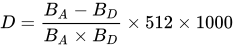
In practice however, some experimentation is usually required to find a suitable delay, due to factors such as the nature and volume of other traffic on the network. The methodology employed by the IPG option may not offer the same level of control provided by some other bandwidth throttling technologies, such as BITS (which is used by Windows Update and BranchCache).
Limitations[edit]
- Robocopy does not copy open files. Any process may open files for exclusive read access by withholding the
FILE_SHARE_READ[12] flag during opening. Normally Volume Shadow Copy Service is used for such situations, but Robocopy does not use it. Consequently, Robocopy is not suitable for backing up live operating system volumes. However, a separate utility such as ShadowSpawn[13] (under MIT License) or DiskShadow[14] (included with Windows Server 2008), can be used beforehand to create a shadow copy of a given volume, which Robocopy can then back up.
- Robocopy versions on systems older than Windows Vista do not mirror properly. They ignore changed security attributes of previously mirrored files.[15][16]
- When specifying the
/MT[:n]option to enable multithreaded copying, the/NPoption to disable reporting of the progress percentage for files is ignored. By default the MT switch provides 8 threads. The n is the number of threads you specify if you do not want to use the default.[17]
GUI[edit]
Although Robocopy itself is a command-line tool, Microsoft TechNet provided a GUI front-end called Robocopy GUI. It was developed by Derk Benisch, a systems engineer with the MSN Search group at Microsoft, and required .NET Framework 2.0.[18] It included a copy of Robocopy version XP026. It is no longer available from Microsoft, but may be downloaded from the Internet Archive's Wayback Machine.[19]
There are non-Microsoft GUIs for Robocopy:
- RoboCopy GUI by PC Assist Software v3.0 (includes job scheduling) (April 19, 2024) [20]
- Cinchoo's ChoEazyCopy, Simple and powerful RoboCopy GUI v2.0.0.1 (March 11, 2022)[21]
- "Easy RoboCopy", latest version 1.0.16 released on January 11, 2022.[22]
- "WinRoboCopy" revision 1.3.5953.40896 released on April 19, 2016.[23]
- RoboCop RoboCopy, Robocopy GUI Skin and script generator with Progress Monitoring, 10 September 2015.[24]
- A program by SH-Soft, also called "Robocopy GUI" v1.0.0.24 (October 8, 2005).[25]
Ken Tamaru of Microsoft developed a copying program with functionality similar to Robocopy, called RichCopy, this was discontinued in 2010. It is not based on Robocopy, and does not require .NET Framework.[26]
Versions[edit]
All versions of Robocopy store their version number and release date in their executable file header, viewable with File Explorer or PowerShell. Some of them (not all) report their version numbers in their textual output.
| Product version | File version | Year | Bundled with |
|---|---|---|---|
| 1.54 | — | 1996 | Windows NT 4.0 Resource Kit |
| 1.70 | — | 1997 | Windows NT Resource Kit |
| 1.71 | 4.0.1.71 | 1997 | Windows NT Resource Kit |
| 1.95 | 4.0.1.95 | 1999 | Windows 2000 Resource Kit |
| 1.96 | 4.0.1.96 | 1999 | Windows 2000 Resource Kit |
| XP010 | 5.1.1.1010 | 2003 | Windows 2003 Resource Kit |
| XP026 | 5.1.2600.26 | 2005 | Robocopy GUI v.3.1.2 |
| XP027 | 5.1.10.1027 | 2008 | Windows Vista, Server 2008, 7, 2008 R2 |
| 6.1 | 6.1.7601 | 2009 | KB2639043 |
| Same as Windows | Windows 8 and later, Windows Server 2012 and later | ||
See also[edit]
- List of file copying software
- Command line
- GUI
References[edit]
- ^ "April 23, 2024—KB5036980 (OS Builds 22621.3527 and 22631.3527) Preview". Microsoft Support. Microsoft.
- ^ "AMA with Dave Plummer, creator of Task Manager". Reddit.com. 18 December 2020. Retrieved 19 December 2020.
- ^ "Robocopy.exe - Robust File Copy Utility - Version XP010" (PDF). Microsoft. 2003.
Backup mode copies [...] enable you to copy some files as a Backup Operator that you would not be able to copy as a normal user.
- ^ "Default groups". Microsoft.
Backup Operators [...] Members of this group can back up and restore all files [...], regardless of their own individual permissions on those files.
- ^ Lewis, Dick (15 November 2004). "Robocopy XP010 FAQ". Windows IT Pro. Penton Media. p. 2. Archived from the original on 9 October 2012.
- ^ Holliday, Grant (7 December 2009). "Multi-threaded robocopy for faster copies". Grant Holliday's Blog. Microsoft. Archived from the original on 13 August 2018.
- ^ Liang, Han; Zou, Lucy; Xu, Simonx (23 February 2023). "Return codes that are used by the Robocopy utility in Windows Server 2008 or Windows Server 2008 R2". Windows Server troubleshooting. Microsoft – via Microsoft Learn.
- ^ Berkouwer, Sander (7 September 2020). "RoboCopy supports Copying Files over SMB with Compression on Windows Server 2019, and beyond". dirteam.com. Retrieved 14 February 2021.
- ^ Smith, Russell (27 November 2020). "SMB Compression Lowers Bandwidth and Improves Copy Times in Windows Server and Azure". Petri.
- ^ "Robocopy". Microsoft Technet. 7 June 2020.
- ^ "Robocopy". Microsoft Docs. Microsoft. 31 October 2016. Retrieved 14 January 2019.
- ^
"CreateFile function". Windows App Development. Microsoft – via Microsoft Learn.
FILE_SHARE_READ [...] Enables subsequent open operations on a file or device to request read access. Otherwise, other processes cannot open the file or device if they request read access.
- ^ "ShadowSpawn". Craig Andera. Retrieved 2015-07-14.
ShadowSpawn.exe is an open source MIT licensed tool that creates and manages shadow copies.
- ^ "Diskshadow". Microsoft TechNet. Retrieved 2013-03-06.
DiskShadow.exe is a tool that exposes the functionality offered by the Volume Shadow Copy Service (VSS).
- ^ "Microsoft's Robocopy compromise". ZDNet. 2008-08-04. Archived from the original on March 17, 2010. Retrieved 2012-11-11.
- ^ "Ugly bug in Robocopy - ignoring security on file level - Martin Zugec blog". Msmvps.com. 2008-03-03. Retrieved 2012-11-11.
- ^ "Robocopy's /MT option disables /NP option". Microsoft TechNet. 2009-12-13. Retrieved 2014-02-26.
- ^ Joshua Hoffman (November 2006). "Utility Spotlight Robocopy GUI". TechNet Magazine. Microsoft Corporation and CMP Media, LLC. Retrieved 2008-07-17.
- ^ "Is Microsoft's Robocopy GUI still available". Windows TenForums. Retrieved 2 May 2022.
- ^ Rose, Darren. "PC Assist Software - RoboCopy GUI". www.pcassistsoftware.co.uk. Retrieved 2024-03-08.
- ^ Cinchoo (11 March 2022). "Cinchoo's ChoEazyCopy". GitHub.
- ^ "Easy RoboCopy". TribbleSoft. Retrieved 2022-05-02.
- ^ "WinRoboCopy - UpWay2Late.com Software". Upway2late.com. Retrieved 2012-11-11.
- ^ turnssoft (10 September 2015). "RoboCop RoboCopy". SourceForge.
- ^ "SH-RoboCopy GUI". SH-Soft. Retrieved 2012-11-23.
- ^ Hoffman, Joshua (November 2006). "Free Utility: RichCopy, an Advanced Alternative to RoboCopy". TechNet Magazine. Microsoft Corporation and CMP Media, LLC. Retrieved 2008-07-17.
External links[edit]

- Official sources
- Microsoft Robocopy documentation
- Robocopy download (Version XP010) as part of Windows Server 2003 Resource Kit Tools. Includes 35-page documentation "robocopy.doc".
- Robocopy short documentation on Microsoft TechNet Library
- Robocopy GUI download (Version 3.1.2.0) on Microsoft TechNet Magazine
- Other